

KNX-GW-RS232-RS485 GATEWAY
INFORMACIÓN DEL FABRICANTE
| Brand | : Arcus |
| Reference | : 40220186 |
| Family | : gateways |
| Color | : |
| Warranty | : 2 years |
| Return allowed | : No |
MORE MANUFACTURER INFORMATION
| Price group | : 1 |
| NC/TARIC code | : 85437090 |
| Country of origin | : DE |
| Gross weight | : 19 g |
| Length | : 8.6 cm |
| Width | : 8.6 cm |
| Height | : 8.6 cm |
SPECIFICATIONS
- INTERFACE
- KNX
- GATEWAY TYPE
- Audio-videoRS-485RS232
- A/V GATEWAY PROTOCOL
- serie RS-232
- AUDIO/VIDEO TYPE
- Gateways
DESCRIPCIÓN
It combines elements of building automation with a variety of components from light and entertainment technology.
Applications can be programmed, updated or exchanged using the built-in USB port.
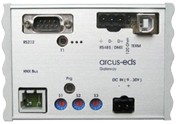
The KNX Serial Gateway is bidirectional. It receives data telegrams on the KNX Bus and generates serial telegrams using the internal interface program. A new KNX telegram can also be created when a serial telegram is received.
GALERÍA
Envíanos tu consulta sobre este producto
Inicia sesión para enviar una consulta.
Inicia sesión para enviar una valoración.
VALORACIONES
Cargando valoraciones…
Frequently asked questions about this product
1How to install the driver in Windows 10?
To do this the driver signature enforcement in Windows 10 must first be disabled. Follow following steps: a. Press the Win + C and click on PC settings. b. Switch over to the “Update & recovery” section. c. Then click on the Recovery option on the left hand side. d. Once selected, you will see an advanced startup section appear on the right hand side. You will need to click on the “Restart now” button. e. Once your Computer has rebooted you will need to choose the Troubleshoot option. f. Then head into Advanced options. g. Then Startup Settings. h. Since we are modifying boot time configuration settings, you will need to restart your computer one last time. I. Here you will be given a list of startup settings that you can change. The one we are looking for is “Disable driver signature enforcement”. To choose the setting, you will need to press the F7 key.
Ask us and we'll answer. If it's a question many people ask, we'll publish it on this page.