

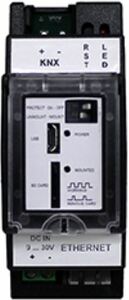
KNX IP Router / Data Logger with advanced functions
INFORMACIÓN DEL FABRICANTE
| Brand | : Arcus |
| Reference | : 40400002 |
| Family | : system-components |
| Color | : |
| Warranty | : 2 years |
| Return allowed | : No |
MORE MANUFACTURER INFORMATION
| Price group | : 1 |
| NC/TARIC code | : 85437090 |
| Country of origin | : AD |
| Gross weight | : 13 g |
| Length | : 7.6 cm |
| Width | : 7.6 cm |
| Height | : 7.6 cm |
SPECIFICATIONS
- SYSTEM COMPONENTS TYPE
- Programming interfaces
- TYPE (PROTOCOL)
- IP
- TCP/IP GATEWAY
- Type, router / gateway
- TYPE KNX/NET-IP (ROUTE, ETC.)
- KNXnet/IP router
- INTERFACE
- KNX
- GATEWAY TYPE
- TCP/IP
DESCRIPCIÓN
FUNCTIONS
- KNXnet / IP Router: Create areas and / or IP lines.
- Tunneling: Communicate and program different installations by IP. With up to 16 simultaneous connections.
- Data Logger: Data storage on SD card, for diagnosis and / or generation of graphics and / or listings.
- Group and bus monitor through HTML: For monitoring and / or diagnosis of the installation at all times.
- NTP Client: Time server functions to synchronize the installation through NTP.
- SMTP Client: Sending notifications via email.
- HTML Visualization: Simple and intuitive.
- Instant messaging: XMPP client.
SECURITY
Encrypted communication (SSH / SFTP SSL): Increases the security of your installation.
Passwords: For different functions.
Tamper: Anti-sabotage switch and parametrizable on the cover.
OPEN SYSTEM
Access to data: SFTP.
Video spot: https://www.youtube.com/watch-v=8kU6Ogrwadc&list=PLsL3T1ygrcyUqYHPOZGODEbMkwVzFlv7O&index=3
GALERÍA
Envíanos tu consulta sobre este producto
Inicia sesión para enviar una consulta.
Inicia sesión para enviar una valoración.
VALORACIONES
Cargando valoraciones…
Frequently asked questions about this product
1How to insert more than one group address in the HTML editor to configure actions that entail states. (Eg, Switch, and update state) What separator should we use in HTML?
The separator used is a blank space, that is, " " (do not use the quotes) Example, if we want to point to the group address 1/1/0 and add its status address 1/1/100 we will write: "1/1/10 1/1/100"
Ask us and we'll answer. If it's a question many people ask, we'll publish it on this page.